





QuickView is an open-source, interactive visualization
tool designed to help Earth system modelers take a quick look at
a collection of physical quantities in their simulation files.
The physical quantities are presented in the form of contour plots on global or regional maps.
Currently, QuickView supports cubed-sphere grids
consisting of either Gauss-Lobatto-Legendre (GLL) nodes (i.e., the ne*np4 grids)
or finite-volume grid cells (ne*pg2, ne*pg3, etc.).
Under the hood, ParaView and VTK supply the data-processing and graphics capabilities, while trame, a Python package, is used to build a browser-based graphical User Interface (UI) to provide intuitive and task-focused controls of the visualization so that users do not need to operate ParaView or VTK themselves.
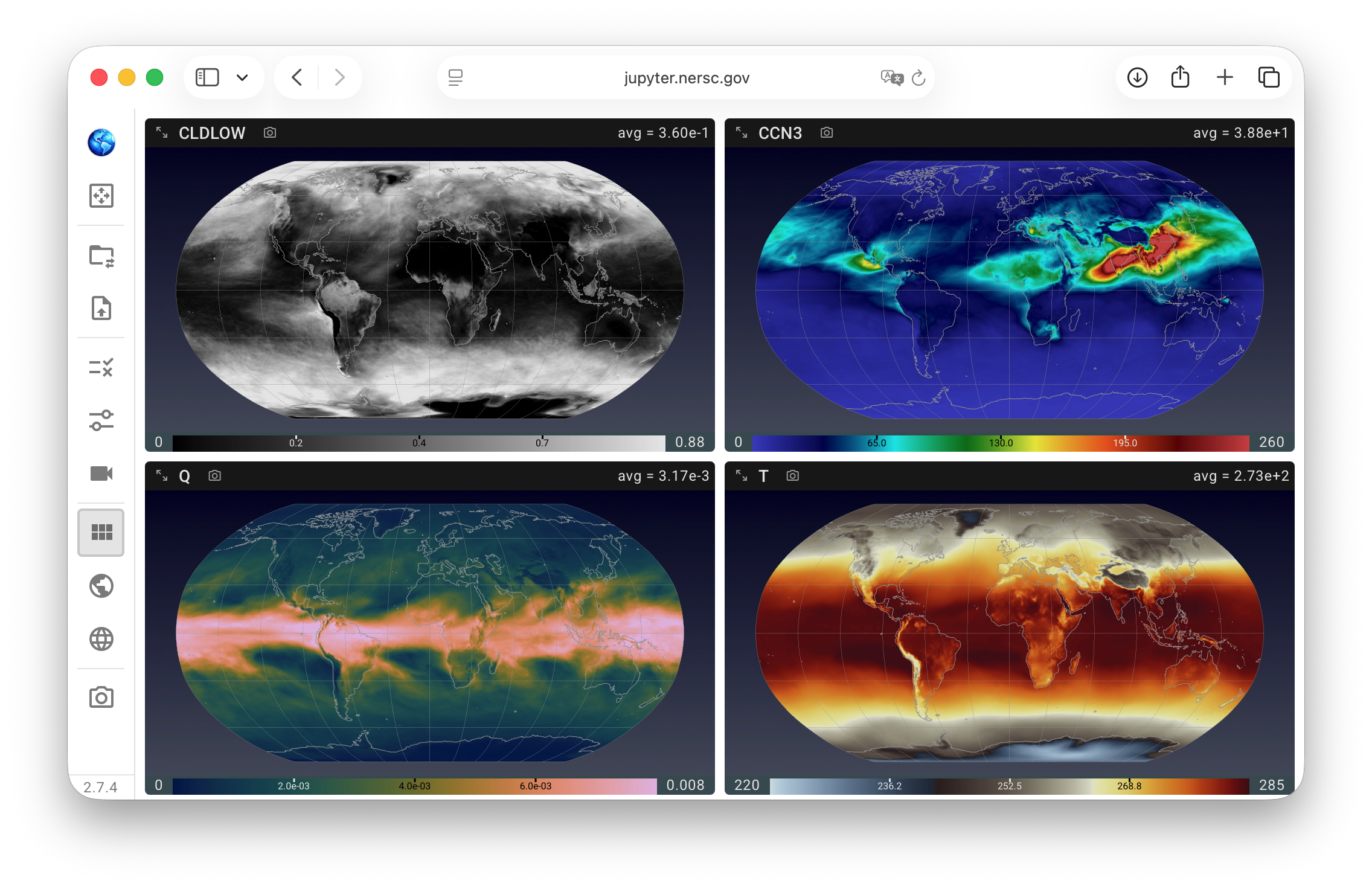
- Intuitive, minimalist interface tailored for Earth system modeling.
- Multi-variable visualization.
- Persistent sessions—pick up where you left off.
- Currently supporting cubed-sphere grids in a variety of configurations. Examples can be found in the visualization gallery.
QuickView supports local installation through desktop bundles or conda, as well as remote usage. See the system requirements and installation instructions.
QuickView's runtime dependencies are listed under requirements.run in the
conda-forge feedstock recipe.
See documentation page.
QuickView is developed by Kitware, Inc. in collaboration with Pacific Northwest National Laboratory, supported by the U.S. Department of Energy's ASCR and BER programs via SciDAC. The development of QuickView used resources of the National Energy Research Scientific Computing Center (NERSC), a U.S. Department of Energy User Facility.
- Lead Developer: Abhishek Yenpure (now at NVIDIA) for version 1; Sebastien Jourdain (Kitware, Inc.) from version 2 onwards.
- Key Contributors: Berk Geveci, Patrick O'Leary, Dan Lipsa, Will Dunklin (Kitware, Inc.); Hui Wan, Kai Zhang (PNNL)
Apache Software License - see LICENSE file for details.
Semantic release rely on conventional commits to generate new releases and changelog.
The repository ships Claude Code skills under
.claude/skills/
to automate recurring maintenance tasks. In a Claude Code session started at the
root of the repository, invoke them with a slash command (or simply ask for the
task, e.g. "validate my changes", and Claude picks the matching skill).
Runs the checks expected before a commit or pull request, then reviews documentation drift.
/validate              # changes since the merge-base with origin/master, plus uncommitted files
/validate all          # the whole repository
/validate docs         # default scope, documentation-related review only
/validate code         # default scope, code-related review only
/validate HEAD~3       # changes since a given git ref
- Deterministic checks (
.claude/skills/validate/scripts/check.py): pre-commit hooks with auto-fix (ruff, prettier, whitespace), codespell (reported, never fixed without asking), version consistency across the semantic-release files, JSON validity, Conventional Commit subjects,python -m e3sm_quickview.app --help, and the VitePress docs build (dead links). - Review guided by a doc-to-code map
(
.claude/skills/validate/references/doc-code-map.md): keyboard shortcuts, CLI options, UI labels, state file contents, CI and developer docs, and configuration paths are compared with the code.
It ends with a report (auto-fixed files, blocking issues, should-fix items, nits, skipped checks). Formatter fixes are applied to the working tree; other findings are proposed and only applied once you agree, except unambiguous factual corrections (e.g., a wrong key letter or file path).
Requirements: pre-commit, QuickView importable from the current Python or a
quickview conda env (for the startup check; skipped otherwise), and npm
for the docs build (dependencies are installed with npm ci when missing).
Recreates the images in docs/guides/quickview/screenshots/ from the current
code by replaying one recipe per image
(.claude/skills/screenshots/recipes.yaml): the state file or data to load,
the UI steps, the crop, and the red highlight boxes.
/screenshots                                    # all images
/screenshots map_projections.png quickview_ui.png   # only these
The skill can also be run directly:
uv run .claude/skills/screenshots/scripts/capture.py --out /tmp/qv-shots   # review first
uv run .claude/skills/screenshots/scripts/capture.py                       # overwrite the docs images
uv run .claude/skills/screenshots/scripts/capture.py --list                # list the recipes
Each capture starts a fresh QuickView server and drives the locally installed
Google Chrome through Playwright. The run prints a work directory with a
before/after review.png, which Claude checks image by image before keeping
the result. Images whose data files cannot be found are skipped and keep their
current version.
Requirements: uv, Google Chrome, a Python
environment with QuickView installed (the quickview conda env by default, or
--python / QUICKVIEW_PYTHON), and the data files referenced by the
screenshot state files, searched by file name under ../Data next to the
repository (or --data-dir / QUICKVIEW_DATA).